A pool automation system lets you control your pool equipment from one controller instead of adjusting each component by hand. It works with any pool type, but what it can control depends on the equipment on your pad.
What a Pool Automation System Actually Does
Automation connects your pool equipment, including the pump, heater, lights, valves, and water features, to one controller so you don’t have to adjust each piece manually.
Instead of walking to the equipment pad to change timers and turn valves, you run everything from an app or a wall panel.
Once the schedules are programmed, the system handles everyday operation automatically.
A Day With Pool Automation: What It Looks Like in Real Life
The easiest way to understand pool automation is to see how it handles everyday tasks without someone standing at the equipment pad.
| Time or Situation | What the Automation System Does |
|---|---|
| Morning | The pump starts at its scheduled time to circulate water and keep the filtration running, without anyone having to turn it on manually. |
| Afternoon | The heater or chiller adjusts the water to the temperature you’ve selected, so the pool is ready when you plan to use it. |
| Evening | Pool and landscape lights switch on before guests arrive, so nobody has to flip switches. |
| Spa Time | A tap in the app changes the system from pool mode to spa mode by turning the valves and starting the heater. |
| Party Mode | One preset command turns on the lights, water features, spa, and other selected equipment simultaneously. |
| Vacation | The programmed schedule keeps the pump and cleaner on schedule and can switch on freeze protection if temperatures drop. |
What Can You Control With Pool Automation?
If your equipment is compatible with the controller, you can run each of these from the app.
Pool Pump and Filtration Schedule
You can set your pool pump to start and stop automatically at the times you choose, keeping water circulating without daily adjustments.
Pool Heater or Heat Pump
You can set the water temperature before you plan to swim, rather than waiting for the pool to warm up after you arrive. Pool chillers are one of the most requested features in our Houston Northwest market, so if your summer water runs too warm, ask whether the controller can run a chiller too.
Spa Mode
With one command, the system switches from pool mode to spa mode by moving the valves and turning on the spa equipment.
Pool Lights and Color Scenes
You can turn pool lights on or off from the app or create preset lighting scenes for quiet evenings or entertaining. Instead of adjusting each light individually, the system changes them all at once.
Water Features
Waterfalls, bubblers, deck jets, and other water features can be activated at will without the need for separate switches. You can also include them in custom schedules or one-touch settings like Party Mode.
Valves and Flow Settings
Automation moves motorized valves automatically to direct water where it needs to go, whether you are running the pool, spa, or a specific water feature.
Cleaner or Sanitizer Integration
Most controllers can run equipment such as robotic cleaners, salt chlorine generators, or other sanitizing systems that work with the controller. Ozone is common in our markets, too. Most pools in our Temecula market use ozone, and Corpus Christi pools often pair chlorine with an ozone generator, so confirm the controller can run yours.
Control Your Entire Pool With One Smart System
Pool automation can simplify daily operation and connect your pump, heater, lights, spa, and water features.
When a Pool Automation System Is Worth It
Pool automation makes the biggest difference when you have more than a basic pump and filter to manage. If you’re constantly adjusting equipment or want your pool ready with less effort, the case for automation gets stronger.
Automation is worth considering if your pool has any of these features.
- An attached spa that you switch between frequently and want to activate with one command.
- A heater or heat pump so you can set the water temperature before you plan to swim.
- Multiple pool or landscape lights that you want to control together instead of operating one at a time.
- Water features such as waterfalls or deck jets that you want to schedule or turn on with a single tap.
- A variable-speed pump that can run on programmed schedules to improve efficiency and reduce manual adjustments.
- An outdoor kitchen or entertainment area where you want everything ready before guests arrive.
- A vacation or second home where you need the pool to keep circulating and operating on schedule while you’re away.
- A layout where you’d rather control everything from an app than walk to the equipment pad for every adjustment.
- A complex equipment pad with several pumps and valves that take time to manage manually.
- A goal of better energy scheduling by running equipment at planned times instead of leaving it on longer than necessary.
When Basic Controls May Be Enough
Not every pool needs a full automation system, especially if your setup is easy to manage by hand.
Basic controls are often enough for a small pool with no spa, no water features, one basic light, and no heater, particularly if you are working with a tight budget or don’t use smartphone apps very often.
If your pool only requires turning the pump on and off and making a few occasional adjustments, standard timers can handle the job without the added cost of automation.
Pool Automation Cost: What Affects the Price?
Automation is a line item inside your inground pool cost. A full automation system typically runs $2,500 to $5,000.
Our franchise owners report these automation prices in their markets.
- Corpus Christi: $2,500 to $4,000
- Houston Northwest: about $2,500
- Dallas-Fort Worth: about $2,500 to $4,000
| Automation Level | Typical Cost Range | Complexity |
|---|---|---|
| Basic timer or control upgrade | Lowest cost tier | Lower complexity |
| App-connected pump and light control | Under $2,500 | Moderate |
| Pool and spa automation | $2,500 to $5,000 | Higher |
| Full luxury automation with spa, heater, lights, and water features | $5,000+ | Premium |
| Retrofit on older equipment | Varies widely | Cost depends on equipment compatibility and any electrical or plumbing upgrades needed. |
Six things move the price most.
- How much equipment the system controls
- Whether it goes on a new build or an existing pool
- Whether your current equipment is compatible
- How many valve actuators and relays you need
- Electrical upgrades at the equipment pad
- Installation and programming labor
New Pool Build vs. Adding Automation Later
If you are building a new pool, adding automation from the beginning is the easiest approach because the wiring and valves are planned as one system. It belongs in the installation process from the design stage, not after the deck is poured.
Existing pools can still be upgraded with automation, but your contractor should first check that your current equipment and electrical setup will work with the new controller.
If older equipment can’t communicate with the controller, it may need to be replaced first.
Planning a New Pool or Retrofit?
Get expert advice on adding automation during construction or upgrading your existing pool.
Pool Automation Features Luxury Homeowners Care About Most
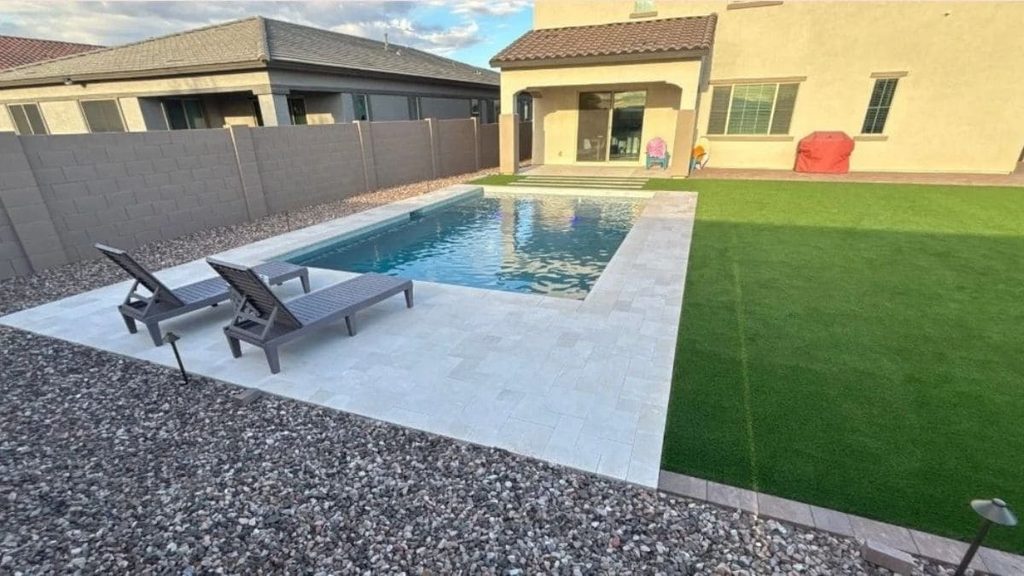
Smart automation is one of the most requested features in our Corpus Christi and Dallas-Fort Worth markets. These five settings are worth programming first.
One-Tap Spa Mode
Start spa mode from your phone on the way home, and the spa is hot by the time you walk out back. Heat-up speed depends on the heater. Our Dallas-Fort Worth builders recommend gas for pool-and-spa combos because it heats the spa faster.
Evening Swim Scene
An evening swim scene turns on the pool lights and any selected landscape lighting before you head outside. You can save the settings once and use the same lighting setup whenever you want.
Energy-Smart Pump Scheduling
The system runs the pump on a programmed schedule instead of leaving it on longer than necessary. This helps reduce wasted energy while keeping the pool circulating throughout the day.
Remote Control While Traveling
You can check your pool equipment and adjust settings from your phone even when you are away from home. Our Temecula builders include app control with freeze protection on every system, so a cold snap won’t catch the equipment off guard while you’re away.
Guest-Ready Settings
You can create a preset that turns on the lights, spa, and water features with a single tap before guests arrive.
Questions to Ask Before Choosing a Pool Automation System
Before you buy, make sure it fits both your current equipment and the way you use your pool. These questions help you avoid paying for upgrades and features you won’t use.
- Will the system work with my current pump, heater, lights, and other equipment?
- Which pool features do I actually want to control from a single app or control panel?
- Can the system be expanded later if I add a spa, water features, or new lighting?
- Will any of my existing equipment need to be replaced before automation can be installed?
- Can I create custom schedules and one-touch settings for everyday use or entertaining?
- How easy is the mobile app for everyone in the household to use?
- What happens if my internet connection goes down? Can I still operate the pool locally?
- Does the installer handle programming and show me how to use the system before the job is complete?
- What warranty comes with the controller and the installation work?
- Will this system make future maintenance and equipment upgrades easier?
FAQs
Does the automation brand matter?
It matters most for compatibility. A controller works best with equipment it was built to talk to, so many builders stick with one brand. Our Corpus Christi builders, for example, use Hayward exclusively so every system stays consistent and easy to service.
Is a pool automation system worth it?
For most new luxury builds, yes. A full system typically runs $2,500 to $5,000, a small share of a project that averages about $75,000 in our Houston Northwest market and about $100,000 in Temecula. It earns its keep fastest on pools with a spa.
Can you add automation to an existing pool?
Yes, and the pump is the first thing to check. Federal efficiency rules that took effect in July 2021 make it hard for single-speed pumps of 1 horsepower or more to qualify, so a replacement pump will likely be variable-speed, which pairs well with automation.
Can automation run two heat sources?
Yes, and in California it often has to. State energy code now requires a heat pump or solar as a new pool’s primary heat source, with gas as backup. In Temecula, that adds about $5,000 to $10,000 to pool-and-spa builds, so pick a controller that can schedule both.
Does pool automation save money?
Mostly through the pump. ENERGY STAR says certified pool pumps use about 70% less energy than standard models, and automation keeps them on efficient schedules. It won’t cut routine upkeep, which still runs about $120 to $500 a month (see our pool maintenance cost guide).
Do I need Wi-Fi for pool automation?
Only for remote access. Schedules and local controls keep working without internet. The more common problem is a weak signal at the equipment pad, which often sits at the far edge of the yard, so test your Wi-Fi there before installation and plan for an extender if it drops.
Plan Your Automation With Your Builder
Automation is easiest to get right when it’s designed with the rest of the equipment pad. Our builders complete more than 1,100 luxury pools a year across 11 markets in 7 states. Find the builder in your market and bring your equipment list to the first design meeting.
Ready to Automate Your Pool?
Discover how a professionally designed pool automation system can make your backyard easier to enjoy every day.